WhatsApp Business Without Personal Number: How to Keep Your Private Number Separate
Learn how to use WhatsApp Business without your personal number by setting up a separate SIM, landline, virtual number, or encrypted SIM solution. This guide explains the safest ways to keep business messages professional while protecting your private number, identity, and communication history.
By GhostSims Team ·
If you run a small business, manage client inquiries, sell online, freelance, or handle customer support from your phone, using your personal number for WhatsApp Business can feel risky fast. Customers may message after hours, your private number can get saved and shared, and separating personal chats from business conversations becomes messy. Ghost Sim helps privacy-conscious users keep business communication more secure by offering encrypted SIM solutions that protect calls, messages, and connection history while giving you a cleaner way to separate personal identity from professional communication.
Here’s the thing: WhatsApp Business still needs a phone number for verification. You cannot create a WhatsApp Business account with no number at all. But you can avoid using your personal number by choosing a separate business number, landline, virtual number, or privacy-focused SIM setup.
This guide explains how to set up WhatsApp Business without your personal number, what works, what often fails, and which option is safest if privacy actually matters.
Can You Use WhatsApp Business Without Your Personal Number?
Yes, you can use WhatsApp Business without your personal number, but you still need a valid phone number to verify the account.
WhatsApp Business does not let you create an account using only an email address, username, or social login. A number is required because WhatsApp uses phone-based verification to confirm account ownership.
The good news is that the number does not have to be your private mobile number.
You can use:
A separate SIM card
A landline number
A virtual phone number
A business phone number
WhatsApp Business Platform/API through an approved provider
A privacy-focused encrypted SIM such as Ghost Sim
The best option depends on how much privacy, reliability, and control you need.
Why Business Owners Avoid Using Their Personal Number on WhatsApp Business
For many businesses, WhatsApp starts casually. A client asks, “Can I message you on WhatsApp?” You say yes. Then one customer becomes ten, then a hundred, and suddenly your personal phone is also your business helpdesk.
That is where the frustration begins.
Your Personal Privacy Gets Exposed
When you use your personal number for WhatsApp Business, customers, suppliers, leads, delivery partners, and strangers may all have access to the same number your family and close contacts use.
That creates privacy risks, especially if your number is shown on:
Your website
Google Business Profile
Social media pages
Online ads
Business cards
Marketplace listings
Invoices or receipts
Once your number is out there, it is difficult to take back.
Before choosing a separate business number, it helps to understand Can You Hide Your Number on WhatsApp? and why WhatsApp still displays your registered number in most account setups.
Work Messages Interrupt Personal Time
WhatsApp Business helps organize customer communication, but it does not magically protect your personal boundaries.
A customer might message at 11:30 PM about an order. A supplier may follow up on Sunday morning. A lead may call repeatedly because they assume WhatsApp means instant availability.
For small business owners, consultants, coaches, ecommerce sellers, real estate agents, and service providers, this can become exhausting.
You Risk Losing Business History
If your personal number is linked to your WhatsApp Business account, changing numbers later can create confusion.
You may need to update:
Website contact details
Social profiles
Google Business Profile
Customer saved contacts
WhatsApp labels and chats
Ads and landing pages
That is why it is better to separate your business number early instead of fixing the problem after customers already know your private number.
Failed Solutions People Try First
Before choosing a proper setup, many users try quick fixes that sound easy but do not always work.
Using a Random Free Number App
Some free number apps may receive SMS codes, but many are blocked, recycled, unreliable, or already used on WhatsApp.
The problem is simple: WhatsApp often detects numbers from low-quality VoIP pools. Even if the number works once, you may lose access later if the provider recycles it or stops forwarding verification codes.
That is a serious risk for a business account.
Using a Friend or Family Member’s Number
This can work technically, but it is not a smart business setup.
If the person changes their number, loses access, removes the SIM, or receives verification requests later, your WhatsApp Business account may become difficult to recover.
It also creates ownership confusion. Your business communication should not depend on someone else’s personal number.
Using Your Personal Number Temporarily
This is probably the most common mistake.
A business owner thinks, “I’ll use my personal number for now and change it later.” But once customers start saving that number, the temporary setup becomes permanent.
Let’s be real, customers do not always update contact details. Some will keep messaging the old number for months.
Best Ways to Set Up WhatsApp Business Without Personal Number
There are several safe ways to use WhatsApp Business without exposing your private number. Here are the main options, starting with the most practical.
Method 1: Use a Separate SIM Card for WhatsApp Business
A separate SIM card is one of the simplest ways to create a clean split between personal and business communication.
You buy or activate a second number, use it only for WhatsApp Business, and keep your personal number private.
How to Set It Up
Get a separate SIM card or business mobile number.
Install WhatsApp Business on your phone.
Enter the new business number during setup.
Verify the number through SMS or voice call.
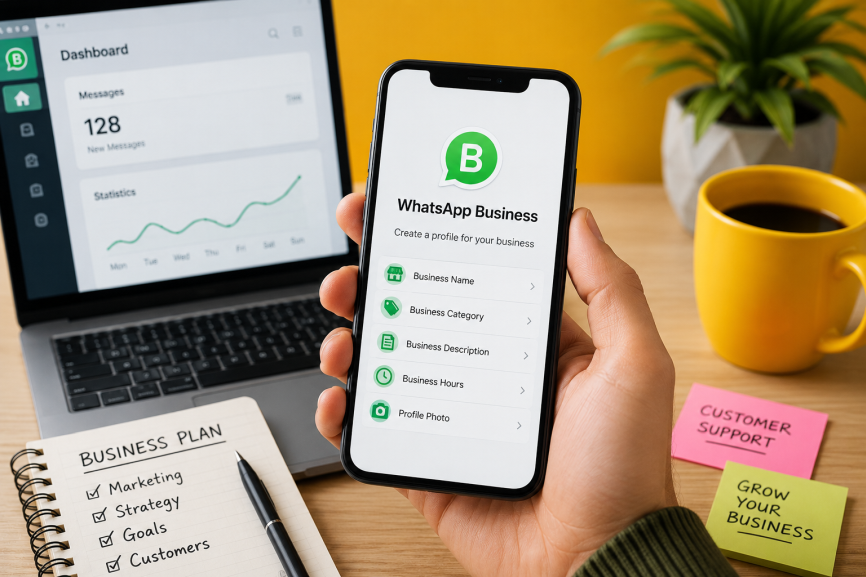
Add your business name, category, description, hours, and catalog.
Share only this number with customers.
Why This Works Well
A separate SIM gives you stronger ownership than many free virtual number services. You can receive verification codes directly, recover the account more easily, and keep your business identity separate.
This is especially useful for:
Freelancers
Ecommerce sellers
Consultants
Local service businesses
Agencies
Privacy-conscious professionals
International users who do not want to expose their main number
For users who need stronger privacy, Ghost Sim offers an encrypted SIM option designed to secure voice, data, calls, messages, and connection history while helping keep personal identity separate from business communication.
Method 2: Use a Landline Number for WhatsApp Business
WhatsApp Business officially supports landline verification, which makes this one of the most reliable ways to avoid using your personal mobile number.
This is a good option if your business already has a fixed office number.
How to Verify WhatsApp Business With a Landline
Download the WhatsApp Business app.
Enter your landline number with the correct country code.
Do not add unnecessary leading zeros.
Wait for the SMS verification timer to expire.
Select the “Call me” option.
Answer the automated call.
Enter the 6-digit verification code into WhatsApp Business.
Pros of Using a Landline
It is officially supported by WhatsApp Business.
It keeps your personal mobile number private.
It looks professional for local businesses.
It works well for offices, clinics, shops, agencies, and service providers.
Cons of Using a Landline
You must be able to answer the verification call.
You may not receive SMS codes.
It is less flexible if you travel often.
It may not suit digital-only or remote businesses.
If you have a real office line, this can be a solid free method. But if you work remotely, travel often, or want encrypted mobile privacy, a secure SIM may be more practical.
Method 3: Use a Virtual Number for WhatsApp Business
A virtual number can also help you create WhatsApp Business without using your personal number. These numbers are usually provided through VoIP or online phone services.
How It Works
You choose a virtual number provider, purchase or activate a number, then use that number to verify WhatsApp Business. The provider forwards the SMS or voice code to you.
Benefits of a Virtual Number
No physical SIM required
Can work for remote teams
Useful for international businesses
Keeps your personal number separate
May support call forwarding or inbox tools
Risks of Virtual Numbers
Virtual numbers are not all equal.
Some numbers may be rejected by WhatsApp. Some may already have been used by another person. Some providers recycle numbers, which can create security and recovery issues.
For business use, avoid random free-number apps. Choose a reputable provider that supports WhatsApp verification and gives you long-term ownership of the number.
Method 4: Use WhatsApp Business Platform or API for Larger Teams
If your business has multiple team members handling customer messages, the WhatsApp Business app may not be enough.
The WhatsApp Business Platform, often called WhatsApp Business API, is designed for larger operations that need automation, CRM integration, multiple agents, templates, and scalable customer support.
Who This Is Best For
This option is better for:
Ecommerce brands
Customer support teams
SaaS companies
High-volume lead generation teams
International businesses
Companies with multiple agents
How It Works
You sign up through a Meta Business Solution Provider or approved platform. They help register your number with Meta and connect it to inbox, CRM, chatbot, or support tools.
This is not usually the simplest choice for solo users, but it is powerful for businesses that need scale.
For official details, Meta provides information about the WhatsApp Business Platform through its business documentation and support resources.
Method 5: Use a Privacy-Focused Encrypted SIM
For some users, the goal is not just separating business and personal messages. The goal is stronger privacy.
A standard second SIM can separate your numbers, but it may not be enough if you are concerned about identity exposure, sensitive communication, tracking, or connection history.
That is where Ghost Sim becomes relevant.
Ghost Sim is designed for users who want secure voice and data communication while keeping calls, messages, and connection history anonymous and encrypted.
When an Encrypted SIM Makes Sense
A privacy-focused encrypted SIM may be a better fit if you:
Handle sensitive client conversations
Want to avoid exposing your personal number
Need secure calls and messaging
Travel internationally
Work in privacy-sensitive industries
Want stronger separation between personal identity and business communication
Do not want business communication tied to your everyday mobile number
For example, a consultant dealing with high-value clients may not want their private number circulating across WhatsApp groups, invoices, and customer databases. A journalist, investor, legal consultant, or international business owner may need even stricter privacy boundaries.
In those cases, a basic free number app is not enough. You need a setup built around reliability and privacy from the start.
Can WhatsApp Business Work Without a SIM?
Yes, WhatsApp Business can work without a SIM in the same phone after verification, but you still need a valid number to set it up.
For example, you can verify WhatsApp Business using:
A landline
A virtual number
A SIM in another device
A business number
A number registered through WhatsApp Business Platform
Once verified, WhatsApp Business can work over WiFi or mobile data. However, you should keep access to the original number because WhatsApp may require re-verification later.
Many of the same privacy principles apply outside business accounts too, especially for users who want to understand How to Use WhatsApp Without Your Real Phone Number while keeping personal communication more secure.
That is where many users get caught. They verify with a temporary number, lose access, and then struggle to recover the account.
Can I Get a Free Number for WhatsApp Business?
You may be able to get a free number from certain apps or VoIP services, but it is usually not recommended for serious business use.
Free numbers can create problems such as:
Failed WhatsApp verification
Recycled numbers
Account recovery issues
Poor reliability
Possible previous WhatsApp registration
Limited support
Higher risk of losing access
A free number may be fine for testing, but not for a business account connected to real customers, leads, or revenue.
If your WhatsApp Business number is printed on your website, shared with customers, and used for sales, it should be stable and controlled by you.
Can I Get a Separate WhatsApp Number for Business?
Yes, and in most cases, you should.
A separate WhatsApp number helps you:
Protect your personal number
Look more professional
Organize customer messages
Set business hours
Use automated greetings
Create quick replies
Build a product or service catalog
Avoid mixing family chats with customer conversations
This is one of the easiest privacy upgrades a small business can make.
Even if your business is small today, separating your number early prevents problems later.
Step-by-Step: How to Set Up WhatsApp Business Without Your Personal Number
Here is the cleanest setup process.
Step 1: Choose Your Number Type
Decide whether you want to use:
Landline number
Separate SIM card
Encrypted SIM
Virtual number
WhatsApp Business Platform/API number
For most small businesses, a separate SIM or landline is the most straightforward option. For privacy-focused users, Ghost Sim gives a stronger secure communication layer.
Step 2: Install WhatsApp Business
Download WhatsApp Business from the official Apple App Store or Google Play Store.
Avoid unofficial modified WhatsApp apps. They may create privacy, security, and account ban risks.
Step 3: Enter Your Business Number
Add your selected number with the correct country code.
Make sure the number can receive either SMS or voice verification. If you are using a landline, wait for SMS verification to fail, then request a call.
Step 4: Verify the Number
Enter the 6-digit code sent by SMS or provided through an automated call.
Do not share this code with anyone. WhatsApp verification codes are sensitive and can be used to take over accounts.
Step 5: Complete Your Business Profile
Add:
Business name
Category
Profile photo or logo
Business description
Opening hours
Website
Location if relevant
Product or service catalog
This helps customers understand who they are messaging and improves trust.
Step 6: Set Boundaries
Use WhatsApp Business features to avoid turning your phone into a 24/7 customer support line.
Set up:
Greeting message
Away message
Quick replies
Labels for leads, orders, and support
Business hours
Catalog items
This keeps communication professional without exposing your personal life.
WhatsApp Business Without Personal Number: Best Option Comparison
Method
Best For
Privacy Level
Reliability
Separate SIM
Small businesses and freelancers
Good
High
Landline
Local offices and shops
Good
High
Virtual number
Remote or digital businesses
Medium
Varies
Free number app
Testing only
Low
Low
WhatsApp Business API
Larger teams
Good
High
Ghost Sim encrypted SIM
Privacy-focused business users
Strong
High
Common Mistakes to Avoid
Do Not Use a Temporary Number
Temporary numbers are risky because you may need the number again for re-verification.
If you lose access, you may lose your WhatsApp Business account.
Do Not Share Your Verification Code
No legitimate support agent, customer, or provider should ask for your WhatsApp verification code.
Do Not Mix Personal and Business Chats
Even if you use WhatsApp labels, mixing everything under one personal number creates privacy and organization problems.
Do Not Wait Until Your Number Is Public Everywhere
The best time to create a separate business WhatsApp number is before your personal number appears on your website, ads, packaging, invoices, and social profiles.
Is It Safe to Use WhatsApp Business Without Your Personal Number?
Yes, it can be safe if you use a number you control long term.
The safest setup is one where:
You own or control the number
You can receive future verification codes
The number is not recycled or temporary
Your personal number stays private
Your communication setup matches your privacy needs
For casual business use, a landline or separate SIM may be enough. For stronger privacy, encrypted communication, and identity protection, Ghost Sim is a better fit.
Frequently Asked Questions (FAQs)
Can I have WhatsApp Business without a phone number?
No, you cannot create WhatsApp Business without any phone number. WhatsApp requires a valid number for verification. However, that number does not have to be your personal mobile number. You can use a landline, separate SIM, virtual number, business number, or WhatsApp Business Platform number.
Can WhatsApp Business work without a SIM?
Yes, WhatsApp Business can work without a SIM in the same phone after the account is verified. The app can operate over WiFi or mobile data. However, you still need access to the original number for setup and possible future verification. Using a temporary number is risky because losing access can create account recovery problems.
Can I use a landline for WhatsApp Business?
Yes, WhatsApp Business supports landline verification. Enter the landline number, wait for SMS verification to fail, then choose the “Call me” option. WhatsApp will call the landline with a 6-digit verification code. This is one of the most reliable ways to avoid using your personal mobile number.
Can I get a free number for WhatsApp Business?
You may find free number apps, but they are not ideal for business use. Many free numbers are recycled, unreliable, or blocked from WhatsApp verification. If your WhatsApp Business account matters for leads, sales, and customer support, use a number you control long term.
Can I use the same number for WhatsApp and WhatsApp Business?
You cannot use the same number on both WhatsApp Messenger and WhatsApp Business at the same time. If you register your personal WhatsApp number with WhatsApp Business, it moves to the Business app. To keep personal and business chats separate, use a different number.
What is the best way to keep my personal number private on WhatsApp Business?
The best option is to use a separate business number that you control. A landline works well for local businesses, while a separate SIM is practical for freelancers and small teams. For stronger privacy, Ghost Sim offers encrypted SIM solutions that help protect voice, data, messages, and connection history
Final Thoughts: Keep WhatsApp Business Professional and Private
Using WhatsApp Business without your personal number is not only possible, it is the smarter way to build professional communication from day one.
A landline can work for office-based businesses. A separate SIM is simple and reliable. A virtual number may work if the provider is reputable. Larger teams can use the WhatsApp Business Platform. But if privacy is a serious concern, Ghost Sim gives you a stronger foundation by helping protect your voice, data, calls, messages, and connection history.
Your business number should support growth, not expose your personal life. Set it up properly now, and you avoid a much bigger privacy headache later.
Order Your Ghost SIM Online or Contact us on Whatsapp +44 7375 695524