Best Ways to Verify Accounts Without Your Real Number
By GhostSims Team ·
If you’re someone who values online privacy - whether you’re a journalist, business owner, traveler, crypto user, activist, or simply tired of spam calls - account verification can feel frustrating. Most apps and websites demand your real phone number, exposing you to data collection, targeted ads, SIM swap risks, spam, and identity tracking. A lot of people try free SMS websites or disposable apps, only to discover the numbers are blocked, shared publicly, or unreliable. That’s where anonsms.io, GhostSims' sister service for anonymous numbers that can receive verification codes, can help.
Why So Many Platforms Require Your Phone Number
Websites and apps ask for phone verification for several reasons:
Prevent spam and bot accounts
Reduce fraud
Enable two-factor authentication (2FA)
Recover locked accounts
Link user activity across platforms
The problem? Your phone number has become a digital identity marker.
Once connected to social media, banking apps, marketplaces, or messaging platforms, your number can often be traced back to:
Your real name
Your location
Your browsing activity
Other connected accounts
Here’s the thing: many users don’t realize how much information a single phone number can expose until spam, phishing attempts, or account breaches start happening.
According to the Federal Trade Commission (FTC), identity theft and phishing scams involving mobile verification continue to rise every year.
The Frustration With Common “Quick Fixes”
Many people search for:
“How to verify accounts without my number”
“How to create Gmail without phone verification”
“Temporary SMS number for OTP”
“Best burner number for verification”
But most quick solutions fail.
Free SMS Websites Usually Don’t Work
Public SMS inbox sites may seem convenient, but they come with major risks:
Shared inboxes anyone can access
Numbers often blocked by Google, WhatsApp, Telegram, and banks
No ownership or control over the number
Verification codes visible publicly
High fraud association
Too many users end up losing access to accounts because they can’t reuse the same number later.
Many users eventually discover that free verification platforms come with major privacy and reliability issues, which we explain in detail in Why Most Free SMS Receive Sites Fail.
VOIP Numbers Get Rejected Frequently
Services like:
Google Voice
TextNow
Talkatone
TextFree
can work occasionally, but many platforms now detect and block VOIP numbers automatically.
This is especially common with:
Google accounts
WhatsApp
Telegram
TikTok
Financial platforms
Crypto exchanges
You might spend time creating accounts only to hit the dreaded:
“This number cannot be used for verification.”
If you’re comparing disposable verification services with long-term privacy solutions, our guide on Temporary Phone Number vs Anonymous SIM explains the real differences in reliability, security, and account verification success rates.
Best Ways to Verify Accounts Without Your Real Number
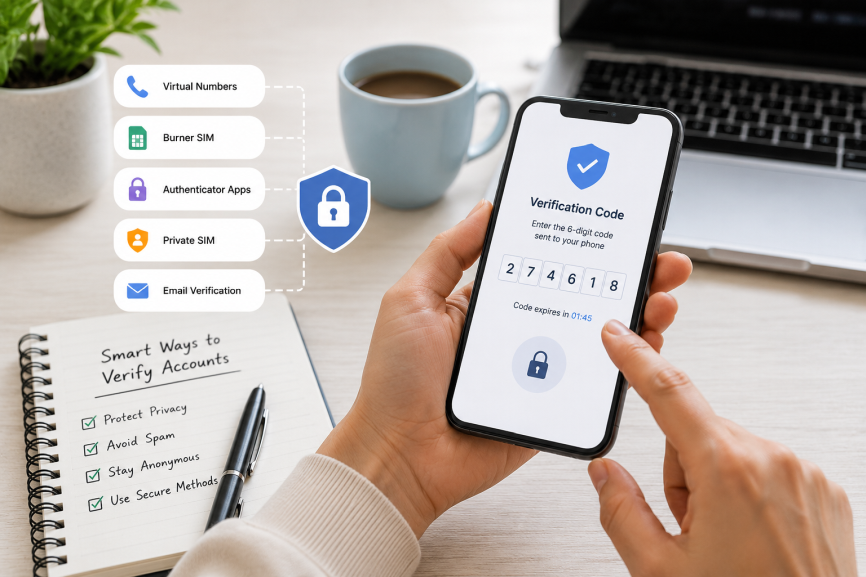
1. Use a Dedicated Private SIM Card
One of the most reliable methods is using a dedicated SIM that isn’t tied to your personal identity.
Unlike free virtual numbers, a private SIM gives you:
Long-term access to the number
Better success rates for OTP verification
More control over account recovery
Reduced tracking exposure
This is where encrypted privacy-focused SIM providers stand out.
For users looking for the most reliable private verification options, our guide on Best SIM Cards for Anonymous OTP Verification compares the top SIM solutions for secure and anonymous account verification.
If you want a deeper breakdown of secure OTP methods, read our guide on How to Receive SMS OTP Without Using Your Real Number (Secure & Private Methods) for more advanced privacy strategies and verification options.
Use the Right Service for Each Job
anonsms.io provides anonymous numbers that can receive verification codes.
GhostSims handles private outgoing calls and encrypted data as a complementary product after verification.
If you’re wondering whether modern eSIM technology can still handle secure OTP verification, our guide on Can You Receive OTP on eSIM? explains how eSIMs work for private account verification and two-factor authentication.
2. Use Authenticator Apps Instead of SMS
Once your account is created, switch away from SMS verification whenever possible.
Best Authenticator Apps
Google Authenticator
Microsoft Authenticator
Authy
2FAS
These apps generate temporary login codes offline, making them far safer than SMS-based verification.
Why This Matters
SMS verification is vulnerable to:
SIM swapping
Carrier interception
SMS phishing
Network attacks
Authenticator apps eliminate many of these risks.
If protecting your privacy during account verification is a priority, our guide on Secure Ways to Receive Verification Codes Privately covers additional strategies for receiving OTPs without exposing your personal information.
3. Create Accounts Through Alternative Signup Methods
Some platforms allow account creation without requiring a number immediately.
Gmail / Google Account Tricks That Sometimes Work
Users often succeed by:
Creating accounts in Incognito Mode
Signing up through Android device settings
Using YouTube app signup flows
Creating accounts through Apple Mail or Outlook integrations
Google may present a “Skip” option during phone verification depending on:
Device trust level
IP reputation
Browser history
Account creation frequency
Results vary, but many users have reported success using these methods.
4. Use a Physical Burner SIM for Short-Term Accounts
For temporary projects, marketplaces, or testing accounts, prepaid SIM cards remain effective.
Popular options include:
Mint Mobile
Ultra Mobile
Tello
Lycamobile
These typically work better than free virtual numbers because they appear as real carrier-issued mobile numbers.
However, many prepaid SIMs still require registration depending on your country’s regulations.
That’s important if privacy is your goal.
5. Use Privacy-Focused Email Providers
Some platforms let users verify through email instead of a phone number.
Privacy-focused providers include:
Proton Mail
Tutanota
Skiff
These services often minimize tracking and may not require extensive personal information during signup.
For users building anonymous or compartmentalized digital identities, pairing secure email with a private SIM creates much stronger privacy protection.
Who Benefits Most From Private Verification Methods?
Journalists and Activists
In regions with surveillance concerns, protecting communication channels becomes critical.
Using personal numbers can expose:
Contacts
Location data
Communication history
Business Owners
Many entrepreneurs separate:
Personal accounts
Customer communication
Marketing platforms
Marketplace accounts
Using a dedicated verification number helps keep business operations cleaner and more secure.
Travelers
International travelers often avoid using their primary number online due to:
Roaming vulnerabilities
Public WiFi risks
Temporary regional accounts
A secure SIM solution can reduce exposure while traveling abroad.
Crypto and Privacy-Conscious Users
Crypto users already understand operational security.
The same principle applies to account verification:
Don’t connect your entire online footprint to one personal number.
What to Avoid When Verifying Accounts Privately
Avoid Shared Public Numbers
If multiple people can access the inbox, your account isn’t secure.
Avoid Reusing One Number Everywhere
Using the same number across:
Banking
Dating apps
Social media
Shopping accounts
creates an easy identity trail.
Avoid SMS-Only Security
Whenever possible:
Enable authenticator apps
Use backup codes
Add recovery emails
SMS alone is no longer considered strong security.
The Safer Long-Term Approach
Let’s be real - online privacy is getting harder every year.
Most platforms want more:
Phone numbers
Identity verification
Behavioral data
Device tracking
That’s why more users are moving toward layered privacy strategies:
Private SIM cards
Encrypted communications
Authenticator apps
Secure email providers
Compartmentalized accounts
GhostSims supports private outgoing calls and encrypted data, while anonsms.io covers inbound numbers and verification codes.
Final Thoughts
Verifying accounts without your real number is absolutely possible - but not all methods are equal. Free SMS sites and disposable apps may work temporarily, but they often fail when reliability and security matter most.
For users who genuinely care about privacy, long-term account access, and secure communication, combining a private SIM solution with authenticator apps and privacy-focused email providers offers a much stronger approach.
As online verification requirements continue growing, protecting your identity starts with controlling the information you share in the first place.
Order Your Ghost SIM Online or Contact us on Whatsapp +44 7375 695524